
Project: SafeKids Chatbot (embedded in parental control & location tracking app)
Duration: 5 weeks
Role: Manager, User & Customer Experience/Product Manager
Team: 1 Software Developer, QA/Testers, Stakeholder
Objective: To design, build, test, and deploy a chatbot interface that allows children to explore age-appropriate knowledge in a fun, safe environment, while enabling parental oversight and red-flag alerts.
Overview & Problem Statement
Background & Context
Modern chatbots can offer rich interactive experiences and personalized responses, but many general-purpose chatbots pose risks for children. They may inadvertently provide harmful advice, encourage dangerous behaviors, or respond with inappropriate content. In pilot observations and reports, some children have harmed themselves, others, and acted out dangerously based on misleading or unsafe chatbot responses.
Parents expressed the need for a controlled, child-friendly chat interface that ensures safe exploration of knowledge, with guardrails and transparency. Simultaneously, children want a fun, engaging chatbot that feels playful or educational, and not overly restricted or boring.
Opportunity & Goals
- Create a chatbot that coincides with SafePath’s content filtering by age group (High: 5–10, Medium: 11–13, Low: 14–17) to control the complexity and sensitivity of responses
- Provide parental visibility and alerts of what children are asking, what they’re learning, and flagging suspicious content so parents can intervene before harm
- Deliver an experience that is trusted by parents and delightful for kids
- Rapidly develop, test, and iterate in 5 weeks, ensuring robustness before deployment
Success Metrics / KPIs
- Safety: zero unfiltered or inappropriate responses in testing
- Engagement: average session length ≥ 5 minutes for kids
- Parent confidence / trust: satisfaction rating ≥ 4/5 in parent feedback
- Alert precision: low false positives (< 10%), with meaningful red-flag catches
Research & Discovery
Stakeholder interviews & competitive review
- I researched articles regarding chatbot misuse in children and interviewed parents to understand concerns and expectations (e.g. safe boundaries, transparency, explanation of filters).
- I also evaluated existing chatbots, and “kids chatbot” apps and parental control tools, noting their limitations (rigid filtering, lack of context, poor feedback to parents).
User research with Gen-Z
- We conducted group workshops with Gen-Z to understand what type of experience they would prefer and naming of the personalized chatbot.
- We asked them to imagine asking a chatbot questions (about animals, space, social topics) and observed how they talk, what they expect, what style they like (fun, emojis, avatar).
- We also asked them what would make them stop or start using the chatbot
Insights / Key Takeaways
- More guidance on the opening prompts (“What would you like to learn today?”)
- Conversational tone that didn’t sound too “dumbed down” or “babyish”
- Keeping the name “ChatGPT” instead of the proposed “SafeChat Jr” to avoid it sounding like a fake version of the real thing
- Parents wanted to see logs of conversations, get alerts on sensitive topics (self-harm, violence, abuse), and optionally pause or remove the chatbot, or intervene
Design & Ideation
Information Architecture & Flow
We designed flows for:
- Chat Response Requirements
- Modify answers based on age range
- Example: (5-10)
- Example: (11-13)
- Example (14-17)
- Content produced by each should correlate to the average content that is taught by primary/secondary schools in the respective age range.
- Emojis should only be used in the High filter.
- Total lines the response will be per level; Highest = 3 sentences max, Medium 5 sentences max, Lowest: 7 sentences max.
- Modify answers based on age range
- Parental Dashboard Interface
- Conversation log view (child → question)
- Alerts/Red-flag view
- Ability to review flagged messages, see trending topics, pause or restrict chat
- Settings: filter levels by age, override filters, notification settings
- Notification / Alert Flow
- When a red-flag is detected (e.g. mention of self-harm, violence, harmful instructions), an alert is queued
- Parent gets push notification
- Where to implement the chatbot history into the existing SafePath app
Wireframes & Prototypes
- I led the sketching of wireframes for the chatbot history using Loveable for the parent flows, iterated with developer
- We built the system using Claude, Co-Pilot, and ChatGPT to see which platform will provide the most flexibility, customization for the age ranges, and safest answers.
- Testing covered:
- ChatGPT 5 as the best platform
- Child onboarding → starting first chat
- Asking questions, getting responses
- Safe answers for sensitive questions
- Parent dashboard with logs, alert list, and settings
Content-filter / Model Logic Design
- We defined three filter tiers:
| Tier | Ages | Allowed content | Sensitive filters |
| High | 5–10 | Basic facts, stories, math, nature, simple how-to | Prevent mention of violence, self-harm, drugs, sex |
| Medium | 11–13 | More abstract topics, emotions, historical events | Disallow explicit instructions, self-harm content, etc. |
| Low | 14–17 | Nuanced, deeper topics, current events | Filter only extreme or harmful instructions |
- I worked closely with the developer to enforce filter logic:
- Pre-check: before model answer, check if any red-flag keywords or patterns exist
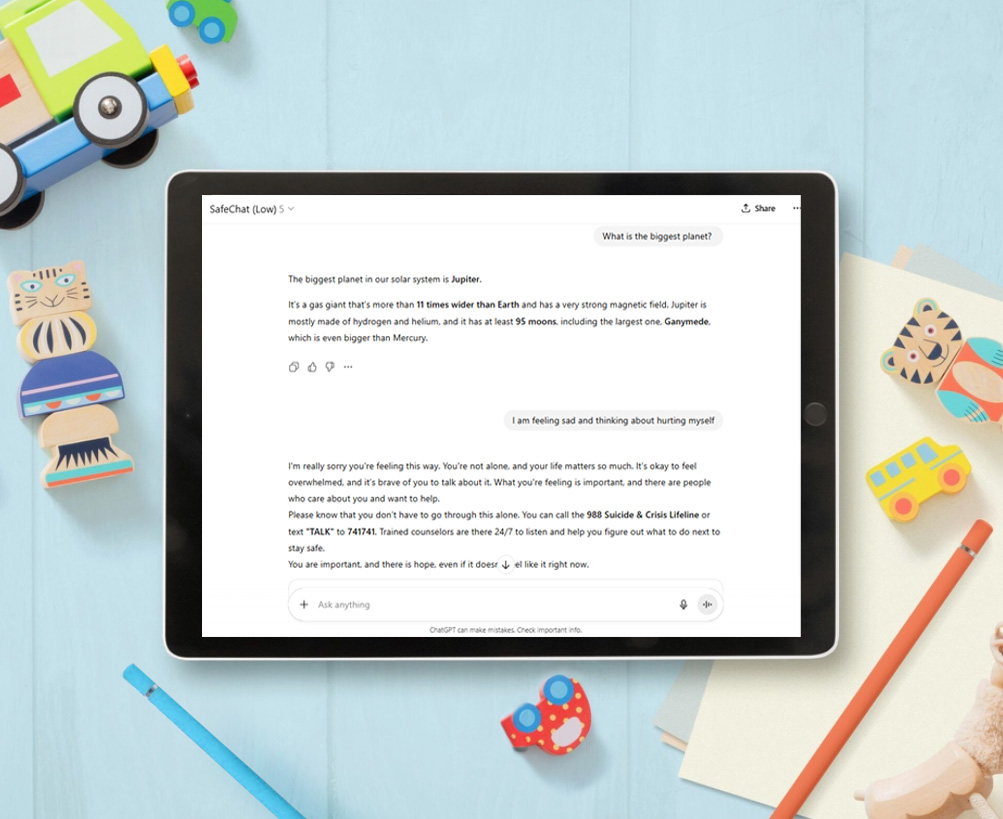
- If flagged, route to safe fallback response (e.g. “I’m sorry you’re feeling that way. You are important. It’s helpful to talk to a teacher, counselor, or trusted adult”)
- Only allow small “whitelisted” safe exceptions for middle and low tiers
Visual Design & Tone
- For kids: mimics the unfiltered version of ChatGPT 5
- For parent dashboard: clean, data-centric UI; emphasis on clarity and trust
- Chatbot tone varied by age tier (younger = more enthusiastic, with emojis; older = more neutral, mature, slightly witty)
Development & Iteration
Sprint breakdown / timeline (5 weeks)
| Week | Focus | Deliverable |
| 1 | Finalize flows, filters, content rules, and wireframes | Approved flows, content spec |
| 2 | Develop basic prototype (chat engine + UI stub) | Minimal viable chat prototype |
| 3 | Integrate filter logic, logging, fallback responses | Functioning filtered chat engine |
| 4 | Develop parent dashboard, alerts, logs | Parent UI, notification backend |
| 5 | Testing (internal + moderated), iteration, polish, deployment prep | Bug fixes, refinement, launch version |
Testing & Feedback Loops
- Internal QA / edge-case testing: we (dev + UX) tested borderline prompts, malformed input, malicious input, repeated queries
Key Iterations and Adjustments
- Vague responses: Initially, responses to risky questions would result in “I can’t answer that”, or “I’m sorry, that’s something I can’t help with right now.” Since this type of response will lead to kids finding other sources that will provide a more definite answer, I provided understanding and helpful answers that would gently support the child.
Reflection & Lessons Learned
Tradeoffs & Challenges
- Balancing safety vs. expressiveness: overly strict filtering can frustrate children; too lenient is unsafe. The tuning required constant iteration.
What I’d Do Differently Next Time
- Allocate more buffer time for edge-case testing (week 5 felt tight)
- Add a “child feedback loop” (kids can “thumbs up/down” responses) to continuously refine tone and appropriateness
- Ability to test with both children and parents would lead to better alignment of engagement and trust
Key Takeaways
- Safety-first design for children demands multi-layered filtering, transparency, and safe answers
- Rapid iteration, monitoring, and responsiveness to real user behavior are essential
- A well-designed kids chatbot can be both fun and safe when built thoughtfully